
Showing posts with label BPA Free thermal paper rolls. Show all posts

Thursday, December 22, 2011

QR Codes On Receipts


Though they aren’t necessarily new, QR (Quick Response) codes are showing up everywhere lately. You can find them in magazines, on business cards, storefront windows, product labeling and displays, billboards or catalogs (just to name a few!). Users with a camera phone equipped with the correct reader application simply scan the image of the QR code to display text, a webpage, Vcard contact details, video and much more.

QR codes are a great way to engage potential and existing customers. That is one reason why some savvy businesses are printing QR codes directly onto their point-of-sale thermal paper receipt! Many POS terminals, POS printers, credit card terminals and cash registers now offer the capability to print graphics on every receipt. This low cost tool makes it possible for you to market to your customers, every time they purchase from you. Adding a QR code is a great way to reward current customers and encourages repeat business.

When used effectively, QR codes offer a strong call to action. When printed on a receipt, you can have your customized code link to:

1. Coupons
2. Contests
3. Surveys
4. Loyalty Programs
5. New products
6. Reviews


Technological advances have made it easier than ever to add custom content to receipts. We spoke with Star Micronics®, Citizen Systems® and CognitiveTPG®, three of the major point-of-sale printer manufacturers to determine their printing capabilities:

“QR codes are printed as bitmapped images (graphics) and users simply insert the QR code as a graphic or logo using the configuration utility of the printer model. For example, for the TSP100, the QR code is saved as a .jpg, so they can insert this QR code image into the configuration utility then set it to print at the top or bottom of the receipt.” Christophe Naasz, Director of Marketing for Star Micronics.

"Our print driver has the ability to scan the receipt printed and if a key word is contained in the receipt a coupon is printed. For example, if you are running a promotion on beer, if a beer purchase is scanned on the receipt a beer coupon would print. This coupon could contain a QR code on the receipt. We can print out a QR barcode in the header or footer as well." said Herb Netal, Dir., Engineering & Business Development
for Citizen Systems.

"In thermal receipt printing the QR code can be printed as a graphic using middleware software to enhance the feature of the receipt. For instance CognitiveTPG two-color thermal and hybrid printers come with a receipt marketing tool to allow the user to add logos and graphics to the header or footer of the receipt. In this case the QR code would be entered as a graphic on the receipt. However this graphic has no actual relation to the printed transaction." said Angela Mansfield, Director of Corporate Marketing at Cognitive TPG. "In order to connect the QR code to the transaction the printer must be able to print it as a symbology or formula which is embedded in the firmware of the printer just as the 2D barcode is printed. The QR code can store more information than the standard 2D linear barcode which is one reason we are seeing an increase demand for this functionality. For instance there are some cases where the user wants to use the QR code to record the historical transaction and additional information in the case of a return to vendor application."

And here are a few technical tips to ensure success with QR code scanning:

* Test your QR codes with multiple readers and devices.
* Use a site like www.bitly.com to shorten the link to create a clean code.
* Make your codes at least 1″ x 1″ to ensure proper scanning.

In addition to printing QR codes directly onto your thermal receipt paper, you may also want to consider custom printed receipt paper rolls. Your message can be printed in full color which has been shown in studies to increase customer retention. For more information, visit our custom printed paper rolls page.

What are your thoughts on QR code technology and it's future? We'd love to hear your feedback!

Friday, June 17, 2011

BPA in Receipt Paper: Cause for Worry….Or Not?

Over the last year I have read numerous articles about BPA and its possible toxic connections to cancer, learning disabilities and infertility. POS Supply Solutions has been following the news on BPA’s effects on human health since 2006 and we have even written two other posts on BPA in Thermal Paper and Identifying BPA Free Paper in the last year. With all the blog posts, independent studies and government reports to sift through, it’s hard not to get confused and overwhelmed by all the information. Here’s the latest news that I have read regarding BPA recently:


Last month on the 23rd, the Environmental Health Research Foundation (a nonprofit research foundation specializing in Health and Environmental Science) stated “Despite the prevalence of recent media articles and blogs about Bisphenol A (BPA), there has been no change in US regulatory policy”, “The Food and Drug Administration (FDA) position on BPA remains unchanged, noting the lack of any creditable evidence of risk to human health”. In addition, the US Environmental Protection Agency’s (EPA) has stated that further regulation on BPA would require more scientific findings than are currently available.

On June 8th, the state of Connecticut House of Representatives approved a bill banning BPA in store receipts after a lengthy debate. This bill would take effect beginning July 1, 2015 unless the EPA issues a mandate before then. The state decided to delay the ban until the middle of 2015 to prevent a burden on businesses that may already be under excessive regulations, giving them time to develop alternatives. Maybe they don’t realize that business owners already have alternatives today? We at POS Supply Solutions have been offering BPA free receipt paper rolls for over 5 years.

What are your feelings are on the subject? Do you think that BPA should be banned in all receipt paper? We’d love to hear your take on this controversial topic!

Thursday, February 17, 2011

Identifying BPA Free Thermal Receipt Paper Just Got a Little Easier


How do you know if the receipt paper you are handling is BPA-Free or not? Up until recently, it has been virtually impossible because all BPA-Free thermal receipt paper looked exactly the same as non-BPA-Free. As we discussed in our December post, a study conducted by the Environmental Working Group in July of 2010 indicated that 40% of the receipts sampled from major retailers contained BPA. While the health effects are still unclear, this study has aroused concerns among consumers as well as retailers. We are pleased to announce that the market is changing.

In November Appleton, North America’s largest producer of direct thermal media announced the addition of easy-to-see red fibers to its most common POS receipt paper grade “Alpha 400-2.1”. Appleton designed its 'red fiber' BPA-free paper to help consumers and retail workers quickly identify the kind of thermal receipt paper they are handling. It is important to note that all Appleton thermal paper is BPA-free, but only the most common receipt grade contains the red fibers.

At this time, offshore supplier Koehler also has BPA-free receipt paper; their grade "KT48FA". Koehler is a large supplier of thermal paper to the US. This simply means that your thermal receipt paper may be BPA-Free even if it doesn't have red fibers.

If you purchase thermal receipt paper and are concerned about the effects of BPA, ask your supplier about the BPA-free options available to you. You can visit http://www.possupply.com/BPA-Free-Thermal-Paper-Rolls for a complete list of the products that we offer.


Tuesday, December 7, 2010

BPA in Thermal Paper

The purpose of this document is to provide our customers and employees with information on Bisphenol A (BPA).

Does the paper that POS Supply Solutions purchases for use in thermal paper receipt rolls contain BPA?BPA Free Thermal Paper Roll

Some of the papers that are outsourced by POS Supply Solutions to fulfill customer requirements and used for retail receipts, gas pump receipts, ATM applications, and other point of sale transaction receipts may contain BPA depending on the source of the paper stock.

What is POS Supply Solution’s position regarding the safety of Bisphenol A?
POS Supply Solutions realizes that the use of BPA in thermal papers is a concern to our customers and the end users of thermal papers. POS Supply Solutions makes no claims regarding the safety of BPA as that is the job of agencies responsible for public health and safety. POS Supply Solutions has three action plans to address the concerns regarding BPA. The first is to monitor the ongoing studies and scientific debate on BPA. The second is to work with vendors from whom we purchase thermal grades containing BPA to assist them in finding alternatives to BPA if the scientific or legislative community recommends or requires such changes. The third is to respond to our customer’s requests for BPA free product.

Does POS Supply Solutions offer BPA FREE Thermal Paper?
POS Supply Solutions realizes that the use of BPA in thermal papers is a concern to our customers and the end users of thermal papers. POS Supply Solutions has a complete line of BPA FREE Thermal Paper Rolls. Please visit
http://www.possupply.com/BPA-Free-Thermal-Paper-Rolls for a complete list.

What is the best source of information on BPA health concerns?
The National Institute of Health (NIH) and the National Toxicology Program (NTP) have been working diligently to determine if BPA presents health and safety risks. NIH and NTP are agencies of the United States Government Department of Health and Human Services. They are affiliated with the Food and Drug Administration (FDA), National Institute for Occupational Safety and Health (NIOSH), Environmental Protection Agency (EPA), Occupational Safety and Health Administration (OSHA) and other agencies that assess risks to public health and safety. NIH and NTP are an excellent source of unbiased information based on scientific analysis of BPA. They operate some of the most respected research centers in the world. BPA toxicology has been a priority at NIH and NTP for several years. Their scientists are assessing its safety by reviewing and analyzing scientific data gathered from laboratories all over the world. We have provided a link to the NIEHS website below where you will find facts on BPA to better understand the issues surrounding BPA. Please spend some time on the website. You will find accurate information on BPA without the possibly inaccurate and/or biased information that can be found on the Internet and in the press.

What is being done to eliminate BPA from thermal paper?
The Environmental Protection Agency (EPA) has been working on this matter and is sponsoring an initiative designed to assist the thermal paper industry in finding safer alternatives to BPA as quickly as possible. Representatives from the thermal paper industry, large retailers (who use thermal paper), the scientific community, the chemical industry, the press, and other interested parties met in Washington with the EPA, NIH, NIOSH, NTP, and other federal health and safety agencies to launch the initiative. POS Supply Solutions will be working on the EPA steering committee and the working group focusing on finding and transitioning to alternatives to BPA.

Do all thermal papers contain BPA?
No, BPA is a component primarily utilized in some thermal point of sale receipt papers. Examples include gas pump receipts, cash register and ATM receipts. Recent independent analyses of thermal receipt papers used by large retailers indicate that roughly half of the receipts tested contained BPA. BPA is not commonly found in thermal labels, tickets and tags. Examples include supermarket labels, event tickets, airline baggage tags, etc.

Where can I find more information regarding the health and safety of BPA?
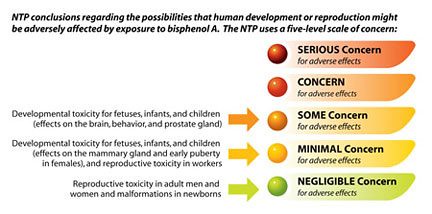
Please review the information below prepared by the NTP. It summarizes the results of NTP’s study on the possible effects of BPA and provides an excellent source of unbiased information.

BPA Concerns
MORE INFORMATION: